# One Prompt, Five Platforms — Only One Rendered It Right

One Prompt, Five Platforms — Only One Rendered It Right
When you first build an AI app, sending a simple string of text to an LLM works perfectly. But the moment you need to inject dynamic data — like a user's name or account status — you have to introduce a "prompt template."
At first glance, this seems like a solved problem: just swap a {{variable}} for a value and move on. The real friction begins when your prompt requires actual logic, like looping through open support tickets or skipping a paragraph unless a customer is a VIP.
At that point, a basic find-and-replace box isn't enough. You need a real template engine to decide whether your app can cleanly keep that logic inside the prompt, or if you have to hardcode messy string-manipulation in your backend.
So we tested this exact boundary by building vip-support-triage, a prompt with one conditional branch and one loop. We ran the exact same prompt, customer message, and downstream model across five platforms:
Langfuse
Opik
Phoenix
Helicone
AcruxCore
Only the platform changed.
Here's the template we were trying to reproduce everywhere:
You are a support triage agent for {{ company }}.
{% if is_vip %}This customer is VIP — prioritize them and skip standard hold times.{% else %}Standard support flow applies.{% endif %}
{% if tickets and tickets.length %}Open tickets:
{% for ticket in tickets %}- #{{ ticket.id }}: {{ ticket.title }}
{% endfor %}{% else %}No open tickets.{% endif %}
That's nunjucks, a JavaScript engine that implements the same tag syntax as Python's Jinja2 — {% if %}, {% else %}, {% for %}, real control flow, not string substitution.
Note on method: each platform was tested in its own session, against its own hosted or self-hosted instance, not side by side in one run. No timing numbers are compared in this post — only whether each platform's editor could express and render the template above.
TL;DR
Three platforms don't have conditional templating at all. Langfuse, Opik, and Helicone all support only flat
{{variable}}substitution — no{% if %}, no{% for %}, verified hands-on on each.One platform has the syntax, but its own UI breaks it. Phoenix's Mustache-based sections can technically express both a conditional and a loop — but typing a real array into its Playground's flat text input doesn't parse, so the loop silently renders blank.
One platform rendered it as written. AcruxCore's nunjucks engine took the exact template above and produced the exact VIP branch and ticket list, with no pre-flattening step.
The gap isn't about maturity — it's about what "prompt management" was built to be. More on that below.
At a glance
| Platform | Templating syntax | Conditional / loop support | What we had to do |
|---|---|---|---|
| Langfuse | Flat {{variable}} |
None | Pre-rendered the VIP note and ticket list into plain text before saving the prompt |
| Opik | Flat {{variable}} |
None | Same flattening — kept only {{company}} and {{customer_message}} as real variables |
| Helicone | Flat {{ hc:var:type }} (typed) |
None | Same flattening again |
| Phoenix | Mustache sections {{#is_vip}}...{{/is_vip}} |
Yes, in theory — one syntax covers both if and for | Typed a real array into a flat text field; the loop rendered blank with no error |
| AcruxCore | nunjucks (Jinja2-style) | Real, distinct {% if %} / {% for %} |
Nothing — pasted the template above, it worked |
What we found, platform by platform
Langfuse: flatten it yourself
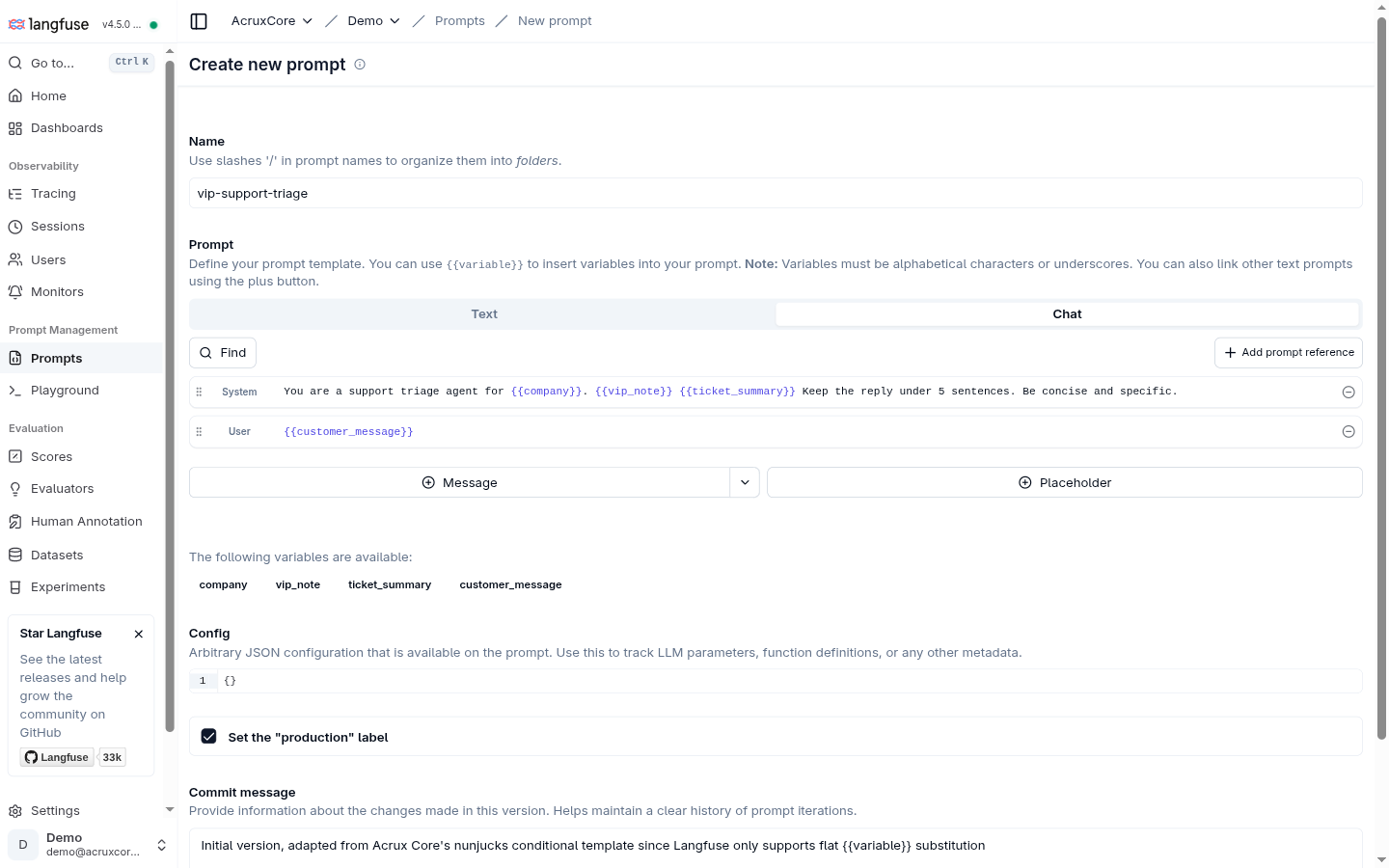
Langfuse's prompt management takes flat {{variable}} substitution, full stop. There's no conditional or loop syntax to reach for, so the only way to get a VIP-aware, ticket-listing prompt into Langfuse is to pre-render the logic in your own application code and hand Langfuse the resulting string. We noted that in the prompt's own commit message when we saved it, so the adaptation is on the record inside the tool itself.
Opik: the same compromise, different box
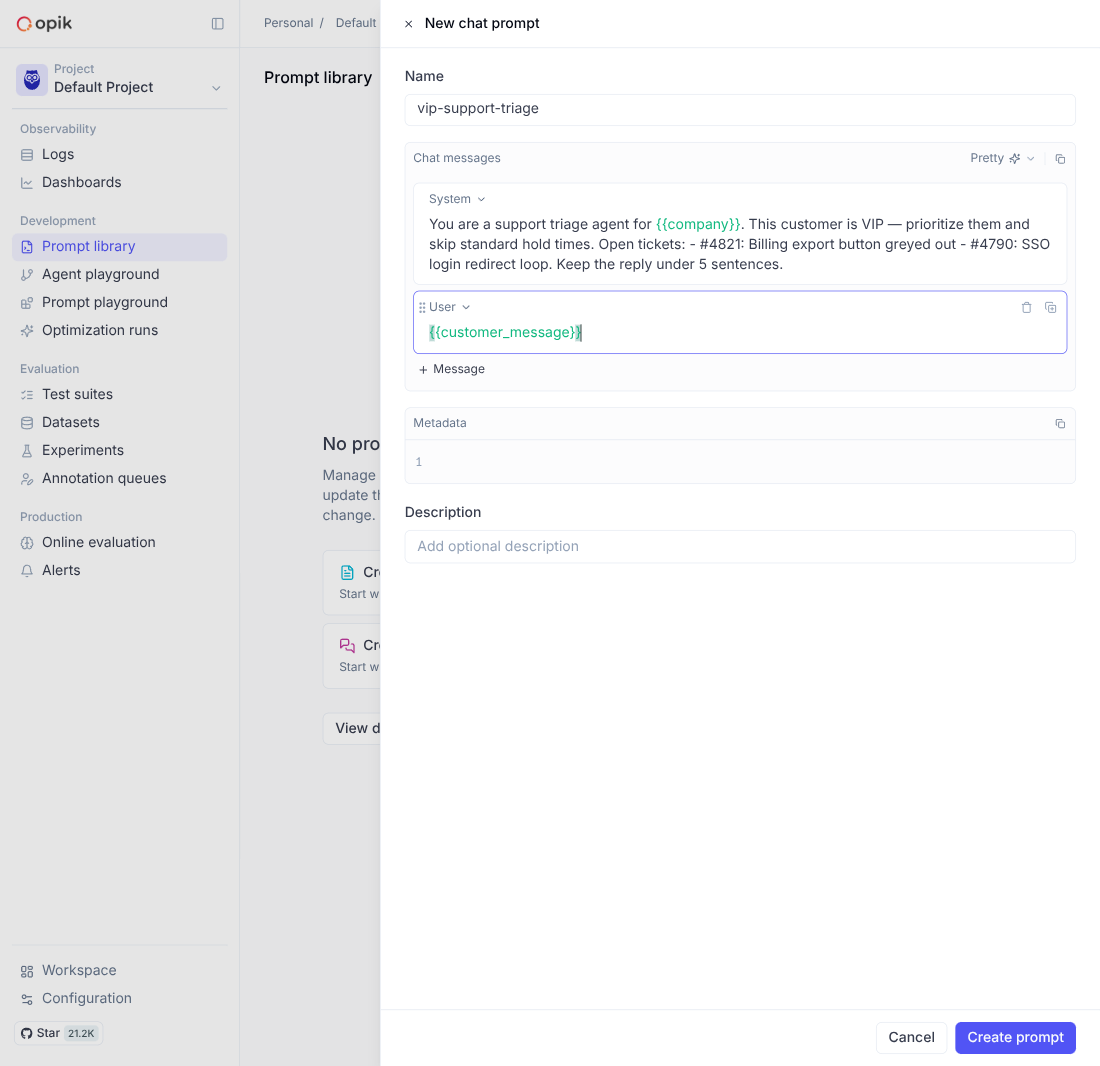
Opik's prompt library — text prompt or chat prompt, same underlying engine — is also flat {{variable}} substitution, confirmed hands-on. There's no {% if %} or {% for %} anywhere in the editor. We made the identical trade-off as Langfuse: flatten the VIP branch and the ticket list into plain text, keep only {{company}} and {{customer_message}} as real template variables.
Helicone: typed variables, still no logic
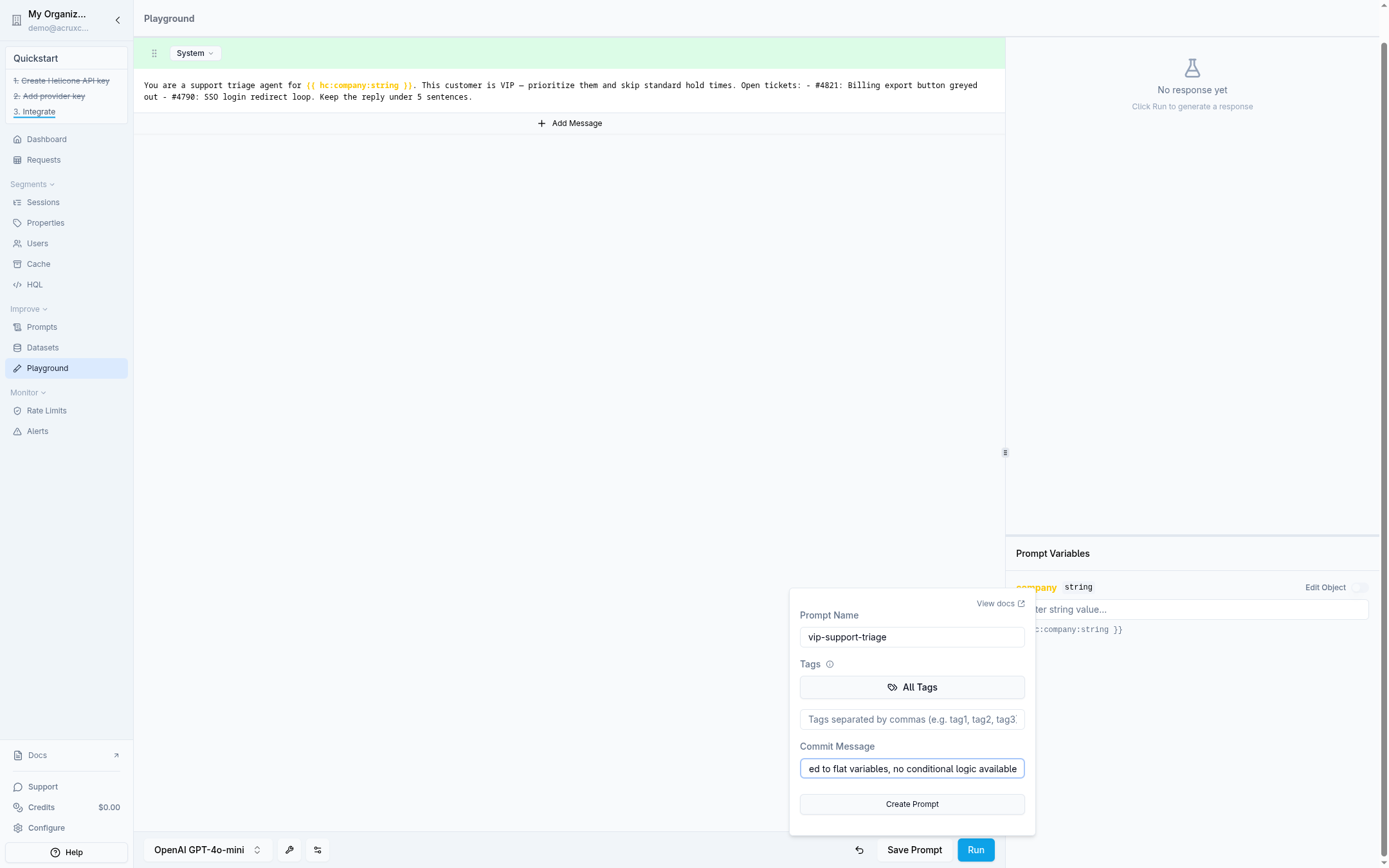
Helicone's twist, per its prompts documentation, is a type annotation baked into the variable itself — {{ hc:company:string }} instead of a bare {{company}}. That's a real, useful feature for catching a wrong-typed value early. It's still flat substitution underneath, with no conditional or loop construct, so the VIP note and the ticket list had to be flattened into plain text before saving — the third platform in a row to force that same compromise.
Phoenix: the syntax exists — the input field is what breaks it
Phoenix is the one platform here that isn't simply "flat substitution." Its Prompt Playground offers Mustache as a templating option, and Mustache does have a way to express both a conditional and a loop — a {{#section}}...{{/section}} block runs once if the value is truthy, or once per item if the value is a list. Same syntax, two jobs — a real difference from nunjucks, where {% if %} and {% for %} are distinct tags.
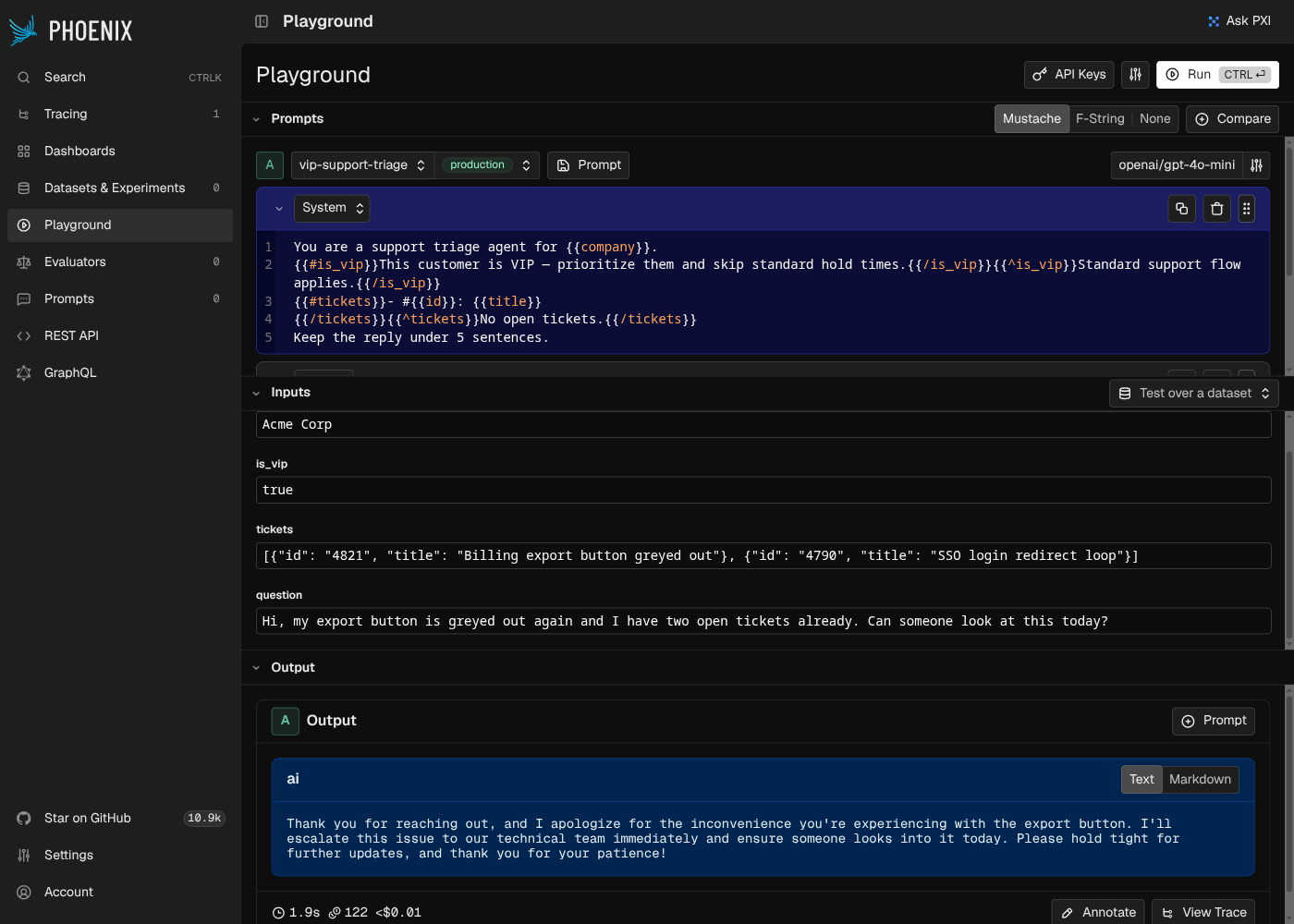
In theory that covers our template. In practice, Phoenix's Playground input fields are flat text boxes. Typing a JSON array into the tickets field for the loop to consume doesn't parse — Mustache treats the whole field as one truthy string, the section runs once with nothing bound, and the ticket lines render blank. No error, no warning. The blank line shows up downstream, in the trace itself:
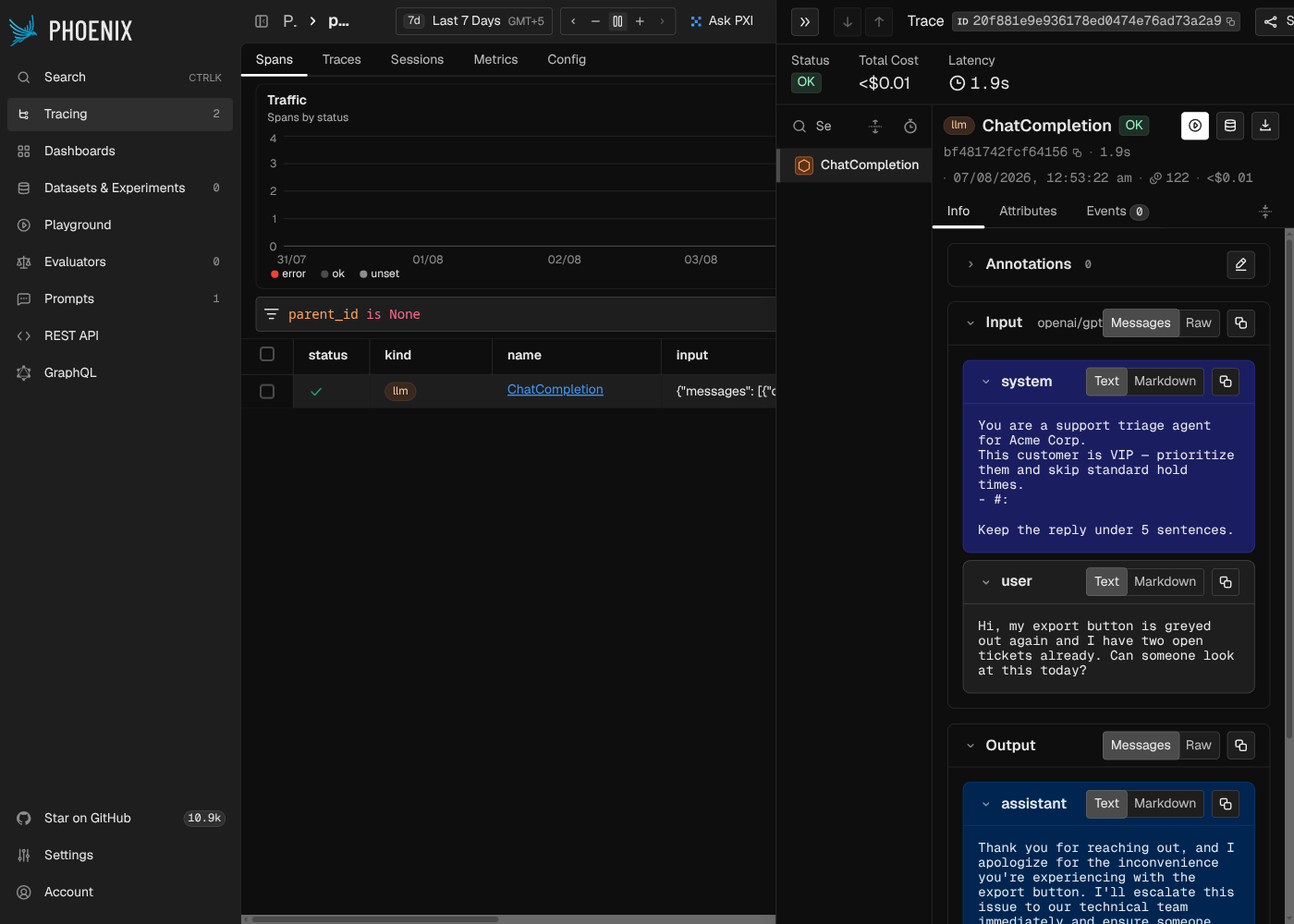
Worth being precise here: this isn't Mustache's fault, and it isn't a templating-engine bug. Phoenix's own Python SDK renders the same template correctly, because there tickets is a real Python list, not a string typed into an HTML input. The failure is specific to the Playground's UI — a structural gap between what the engine can express and what the input field can carry.
AcruxCore: the template above, unmodified
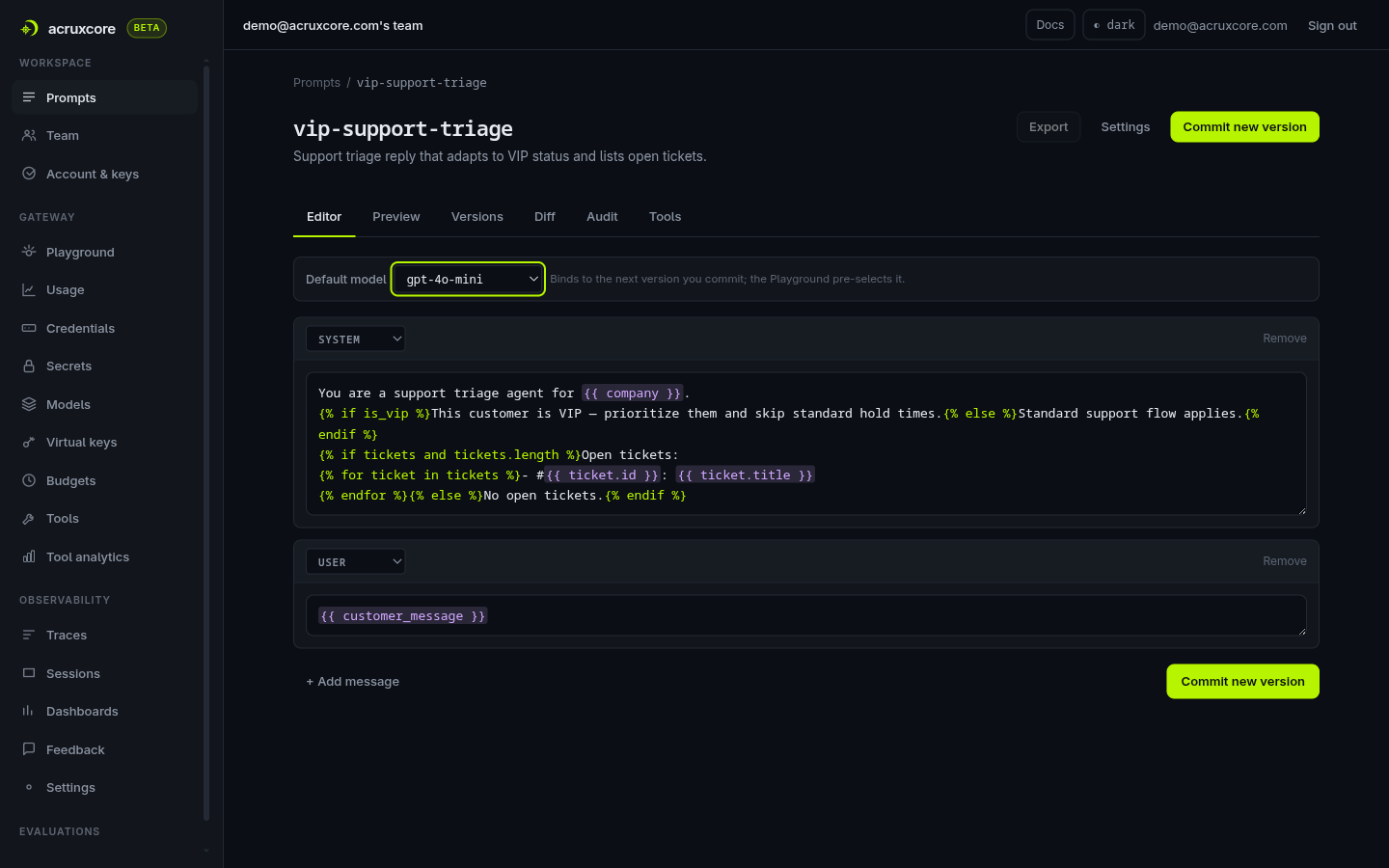
AcruxCore's editor renders with nunjucks, so the template at the top of this post is exactly what we typed — no pre-flattening. The editor highlights {% if %} and {% for %} tags the same way it highlights {{ variable }}, both as template syntax evaluated at render time:
Filling in a company, a message, and a truthy is_vip renders the VIP branch in the editor's preview:
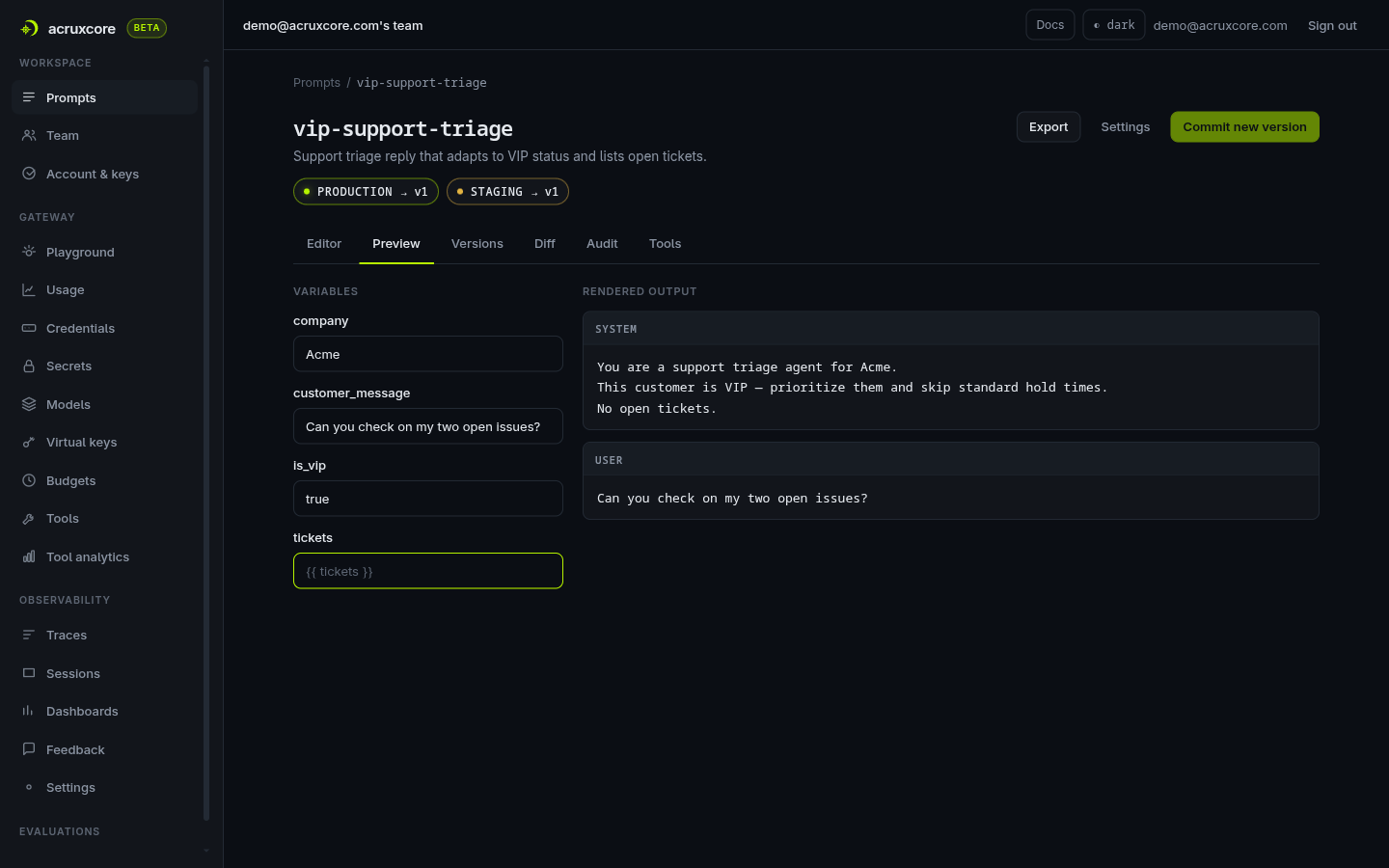
Worth the same scrutiny applied to Phoenix above: this result comes from AcruxCore's own docs and dashboard, not a third party, so read it as one data point rather than a verdict — the per-platform pages linked at the end cover where each tool has the edge on other aspects.
How it works under the hood
The pattern across these five isn't about which team shipped a more polished product — Langfuse, Opik, and Helicone are all mature, widely used tools with real strengths elsewhere. It's about what "prompt management" was for when each product was designed.
Tracing-and-eval-first products treat a prompt as a stored string. Langfuse, Opik, and Helicone all started as observability platforms; prompt storage came later, as a place to version and label the string your application already sends. A find-and-replace on
{{variable}}is enough for that job, so that's what got built.Phoenix's Mustache choice is a deliberate design trade-off, not a shortcut. Mustache is intentionally "logic-less" — collapsing if and for into one section tag is the whole point of the spec, not an oversight. That design works fine when the variable behind a section is a real array or object. It only breaks here because the Playground's input layer hands it a flat string instead.
nunjucks was built as a template language first. AcruxCore's engine implements the same tag set as Jinja2 — a language designed from day one to express conditionals and loops as distinct constructs, with an editor and a Preview tab built around exercising that logic before it ever reaches a model.
Takeaways
Test your hardest prompt, not your easiest one, before picking a platform. A simple
{{customer_name}}swap works everywhere. A VIP branch and a ticket loop is where the real difference shows up.Ask whether templating happens server-side, in the platform, or you're expected to pre-render it yourself. Three of five platforms here leave that work to your application code.
A flat text input will accept structured data without complaint — and mis-render it without one either. Phoenix's bug produced no error message anywhere in the chain; the only sign was a blank line in the output.
"Supports templates" and "supports conditional logic" are different claims. Check for the second one explicitly if your prompts need it — the first one is true of nearly every tool in this space.
About the author
- AI Engineer & Technical Lead with 6 YOE in production ML, agents, and LLMOps
Comments
Join the discussionNo comments yet. Be the first to comment.
Compare Self hosted LLM observability platform
Hands-on comparisons of self-hosted LLM observability tools — Langfuse, Phoenix, Opik, and Helicone etc — with real traces, latency numbers, and setup friction, no marketing copy.